
Mac computer users across UNMC and Nebraska Medicine will soon see an important IT update designed to enhance security and improve device management across the med center network. To continue using Macs on the network, users will need to update a critical security program as part of this transition.
Why is the update necessary?
UNMC and Nebraska Medicine Information Technology and Security are transitioning to Microsoft Intune for the med center’s device security management platform. This move comes with the current contract for Omnissa (formerly VMware) and its Workspace ONE program set to expire in August.
By adopting Intune, the med center will create a more consistent and streamlined experience for managing both Apple and Windows devices. This update will simplify IT support, strengthen security management, and better align device configurations with enterprise-wide IT standards across UNMC and Nebraska Medicine.
Who is impacted?
About 460 Mac users will be affected by the change. The majority are UNMC faculty members, but staff also will be impacted.
When do Mac users need to make the required update?
The phased migration of Mac computers is getting underway, and users have started receiving notifications that their corporate Mac is included in the next group of devices transitioning to Microsoft Intune.
Beginning today (June 1), users will start seeing an “Enrollment Required” prompt on their Mac that will allow them to begin the migration process. The process can be completed from either campus or remotely from home.
The authorized prompt looks like this:
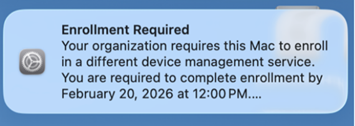
Your organization requires this Mac to enroll in a difference device management services. You are required to complete enrollment …
How long will it take to update my Mac? Can I continue to work during the update?
The migration process typically takes 20 to 30 minutes. During the process, users’ day-to-day work, including core applications and files, will continue to function as expected (even as the computer performs background work to complete the enrollment process).
While the process is straightforward, some users may experience additional prompts or configuration questions during setup. IT support is available throughout the process
I am ready to update my Mac. How do I proceed?
- Option 1: Schedule time with IT at any time – For users who prefer guided assistance, they can schedule one-on-one time – a “white glove” migration appointment – to work directly with a workstation support technician.
- Schedule a support appointment via this link.
- Option 2: Self-service – Use the quick self-service guide below to complete the migration at the user’s convenience:
- The MacOS Migration Self-Service Quick Guide can be found at this link.
- A detailed Mac Intune Migration – Self-Service Enrollment guide can be found at this link.
What happens if I don’t upgrade my Mac before the deadline?
After users have received the email notifying them to complete the migration, they will have until July 27 to complete the process or schedule time for IT resources to assist. If the migration is not completed within that timeframe, the user’s Mac automatically will be required to complete enrollment.
To avoid interruptions, IT strongly recommends users complete the process prior to the deadline.
Questions?
With questions or issues handling the migration process, contact the Service Desk at 402-559-7700 or submit a request through the ServiceNow portal.