
After a couple of weeks of awareness, now’s the time to begin acting.
In the last couple of weeks, articles have been shared on the NOW and UNMC Today about Nebraska Medicine and UNMC transitioning from the Intelligent Hub to Microsoft Intune Company Portal.
Colleagues can now begin to move their personal devices from the Hub over to Microsoft Intune Company Portal by performing the following steps:
- Launch Hub
- Go to Support > Your Device > Unenroll
- Download the Company Portal app (available from either the App Store (Apple iOS users) or the Google Play store (Android users). Android users will need to download Duo as well
- Launch Company Portal, log in, and follow the prompts.
- If you are missing any apps (e.g., Outlook, Teams, etc.), you can search and download them from Company Portal.
For more specific instructions and screenshots showing steps for your device, please see the linked resources:
In-person IT support
IT colleagues will also be available at a variety of locations as part of “tech tents” to assist colleagues who want help downloading Intune or have questions. To see a list of locations and dates for tech tents, click the following link: IT Self-Service – Schedule for Tech Tents for BYOD Intune Migration
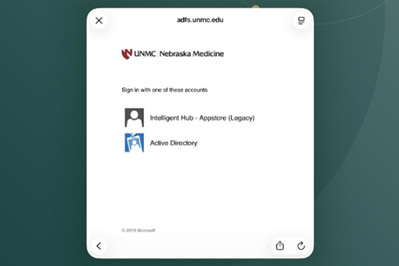
Note that during this migration from the Intelligent Hub to Intune, you may see a different prompt on your phone when launching a work app, as shown in the screenshot below. Once you have migrated to Intune Company Portal, please select “Active Directory” if prompted.
Users may also receive an additional Duo prompt when launching a work app from their phone. Both of these are temporary measures during migration. When the Intelligent Hub platform is fully retired, these additional prompts should be removed.